There are two ways you can find a symbolic link or soft link in UNIX based operating systems like Linux, Solaris, BSD, or IBM AIX. The first way is by using the ls command in UNIX which displays files, directories, and links in any directory and the other way is by using UNIX find command which has the ability to search any kind of file e.g. file, directory, or link. In this UNIX command tutorial, we will see examples of both of these UNIX commands for finding a soft link in any directory. If you are new to UNIX operating system and not familiar with the concept of the soft link and hard link, I would recommend getting a good hand on it, as it is one of the most powerful features of UNIX based system.
One more concept which is quite important to learn is file and directory permissions because UNIX provides a different level of permissions and link inherit permission of destination folder where they are pointing out.
This is also a very popular Linux interview question asked on both system admin as well as the developer-level interview. Anyways Let's start with the first example of how to find a symbolic link in UNIX using the “ls” command:
One more concept which is quite important to learn is file and directory permissions because UNIX provides a different level of permissions and link inherit permission of destination folder where they are pointing out.
This is also a very popular Linux interview question asked on both system admin as well as the developer-level interview. Anyways Let's start with the first example of how to find a symbolic link in UNIX using the “ls” command:
By the way, if you are new to the Linux world then I also recommend you to join a hands-on course like Linux Mastery: Master the Linux Command Line in 11.5 Hours to learn some essential Linux commands like this one to become a more productive and confident Linux user.
ls command to find a symbolic link in UNIX systems
when you run the ls -lrt command in any directory it prints permission details of each file and directories, if you look carefully for links that String starts with a small L ( l for the link).
If you combine the output of the ls command with grep and use a regular expression to find all entries which start with a small L then you can easily find all soft links on any directories.

Here is the full UNIX command example of finding the symbolic link using ls and grep commands:
If you combine the output of the ls command with grep and use a regular expression to find all entries which start with a small L then you can easily find all soft links on any directories.
Here is the full UNIX command example of finding the symbolic link using ls and grep commands:
java67@blogspot:~ ls -lrt
total 3.0K
-rw-r--r--  1 java67 Domain Users 79 Jul 19  2011 test.txt
drwxr-xr-x+ 1 java67 Domain Users  0 Jun 15 12:07 unix/
drwxr-xr-x+ 1 java67 Domain Users  0 Sep 19 12:30 java/
lrwxrwxrwx  1 java67 Domain Users  4 Sep 19 12:31 version_1.0 -> java/
lrwxrwxrwx  1 java67 Domain Users  4 Sep 21 13:59 os -> unix/


java67@blogspot:~ ls -lrt | grep ^l
lrwxrwxrwx  1 java67 Domain Users  4 Sep 19 12:31 version_1.0 -> java/
lrwxrwxrwx  1 java67 Domain Users  4 Sep 21 13:59 os -> unix/
The ^ character is a special regular expression which means the start of the line. You can further check Learn Linux in 5 Days and Level Up Your Career, an Udemy course to learn more options of ls and other essential Linux commands.
Showing soft link using Find command in Unix
Another way to find all soft links or symbolic links is by using the find command in UNIX. Since all UNIX-based operating systems like Linux, Solaris, or IBM AIX support find, it's not only available but the most powerful way to find a soft link in any directory or subdirectory.
When you use the find command with option type and specify the type as small L ( l for the link), it displays all soft links in the specified path.
For example, following the example of find command will show all soft links in the current directory and its subdirectory :
When you use the find command with option type and specify the type as small L ( l for the link), it displays all soft links in the specified path.
For example, following the example of find command will show all soft links in the current directory and its subdirectory :
java67@blogspot:~ find . -type l
./java/version_1.0
./os
./version_1.0
Here the dot (.) character denotes a current directory.
If you want to limit this search only with the current directory and not to a subdirectory than you can specify maximum depth as 1 by using -maxdepth option of find command as shown in the below example :
If you want to limit this search only with the current directory and not to a subdirectory than you can specify maximum depth as 1 by using -maxdepth option of find command as shown in the below example :
java67@blogspot:~ find . -maxdepth 1 -type l
./os
./version_1.0
As I said before, find it very useful command but most of the UNIX user doesn't use find to its full potential. They are not even aware of some of its useful options like this one.
If you are eager to learn more about advanced options of find and other essential commands, I suggest you check Linux System Administration Fundamentals, an online course to learn Linux commands from Pluralsight. You can get this free when you sign up for a 10-day free trial.
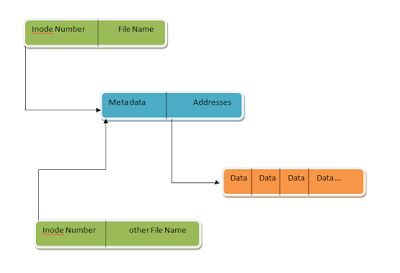
These were two ways to find a soft link or symbolic links in UNIX operating system e.g. Linux, Solaris, or IBM AIX. I am still searching the UNIX command which can find all broken links and will update this example when I got that. By the way, if you guys know any other ways to find, show or display the soft link in any directory or PATH then please share.
Other Linux Tutorials and Resources you may like
Thanks a lot for reading this article so far. If you like these Linux command examples to find soft links then please share them with your friends and colleagues. If you have any questions or comments then please drop a comment.
P. S. - If you are a new Linux user and looking for some free online courses to start your Linux journey, you should check out my list of Free Linux Courses for Programmers, IT Professionals, and System Administrators.
- How to schedule cron jobs in Linux (crontab example)
- 10 examples of Networking commands in Unix (nslookup)
- 7 Best Linux courses for Developers and Cloud Engineers (Courses)
- 5 Example of kill commands in Unix and Linux (example)
- How to find all files matching specific text in Linux (grep)
- 10 Examples of chmod command in Linux (chmod)
- How to send mail with attachments from Linux? (mailx)
- My favorite Linux courses for DevOps Engineers (online courses)
- How does the nslookup command work in UNIX? (answer)
- 10 examples of lsof command in Linux? (examples)
- How to use the netstat command to find which process is listening on a port? (example)
- Linux find + du + grep example (example)
- 5 Best Online courses to learn Linux in-depth (online courses)
- 10 Examples of curl command in Linux (cURL)
- 10 Best Courses to learn the Linux command line (courses)
- A Practical Guide to Linux Commands, Editors, and Shell Programming (guide)
Thanks a lot for reading this article so far. If you like these Linux command examples to find soft links then please share them with your friends and colleagues. If you have any questions or comments then please drop a comment.
P. S. - If you are a new Linux user and looking for some free online courses to start your Linux journey, you should check out my list of Free Linux Courses for Programmers, IT Professionals, and System Administrators.

Hi there! This is my 1st comment here so I
ReplyDeletejust wanted to give a quick shout out and say I genuinely
enjoy reading through your blog posts. Can you recommend
any other blogs/websites/forums that deal with the
same topics? Thanks!